

Huge thanks to both @Joseinnewworld & @SVDG_XEC who are currently shopping my #NFTs at the same time — what a moment 🔥 Your support means a lot and keeps this journey alive. Grateful beyond words 🙏 #NFTcommunity #NFTCollection #eCash $XEC #Crypto https://t.co/2pkDOKjy2R pic.twitter.com/9dmsCqizFz
— NFToa (@nftoa_) June 25, 2025
What You Need for This Project
- Kali Linux machines, real or virtual
- Windows 7 machine, real or virtual
Creating a Windows Test User
- On your Windows 7 machine, click Start
- Type CMD and press Shift+Ctrl+Enter
- If the “User Account Control” box appears, click Yes .
- In an Administrator command prompt window, run this command:
net user jose password /addDownloading and Installing Fabric
Download Cain & Abel for Windows NT/2000/XP. Install with default options.
Problem solving
If that page is blocked, which it is on many campuses, you can get the Cain version of my Website here:
This is a password protected 7-Zip archive. The password is the same
If you don't have 7-zip, get it here:
Extracting Password Hashes with Cain
- On your Windows 7 desktop, right-click the Cain icon and click " Run as Administrator ".
- If the "User Account Control" box appears, click Yes.
- In Cain, in the top set of tabs, click Cracker .
- In Fabric, move the mouse to the center of the window, over an empty white space.
- Right click and click " Add to list... ".
- In the “Add NT Hash from” box, accept the default selections and click Next .
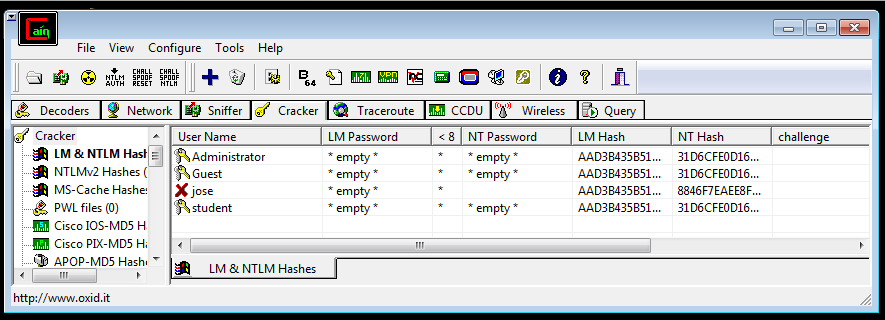
- The hashed password appears, as shown below.
Understanding Password Hashes
There are two password hashes: LM Hash and NT hash.
The LM hash is so old and so weak that even Microsoft eventually stopped using it by default in all versions of Windows after Windows XP.
The NT hash is Microsoft's "more secure" hash, used by Windows NT since 1993 and never updated in any way. As you will see, this hash is also very weak and easy to crack, compared to Linux password hashes.
Cracking four Linux hashes took about 20 seconds using a 500-word dictionary when I did it, but as you'll see, you can crack four Windows passwords using a 500,000-word dictionary in about a second. The Windows password hashes are over 10,000 times weaker than the Linux hashes.
Note that your NT password hash starts with 8846, just like mine. This is because Microsoft doesn't salt the hashes--every user on every Windows machine on Earth has the same salt if they use the password password .
That means you can often crack Windows password hashes just by Googling, as many lists of common passwords and hashes have been uploaded to the Internet over the past 20 years.
However, we will use hashcat, which is a very powerful way to crack passwords.
Exporting Hashes to Text File
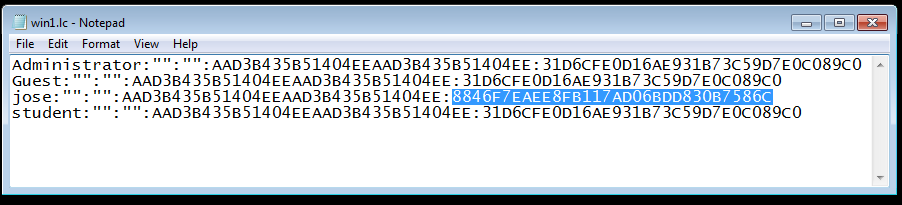
- In Cain, right-click jose and click Export . Save the file in your Documents folder with the name win1 in the default format (L0phtCrack 2.x file).
- Open the win1.lc file in Notepad.
- Carefully highlight the NT hash for Jose, as shown below, right-click, and click Copy
Pasting Hashed Passwords into Kali Linux
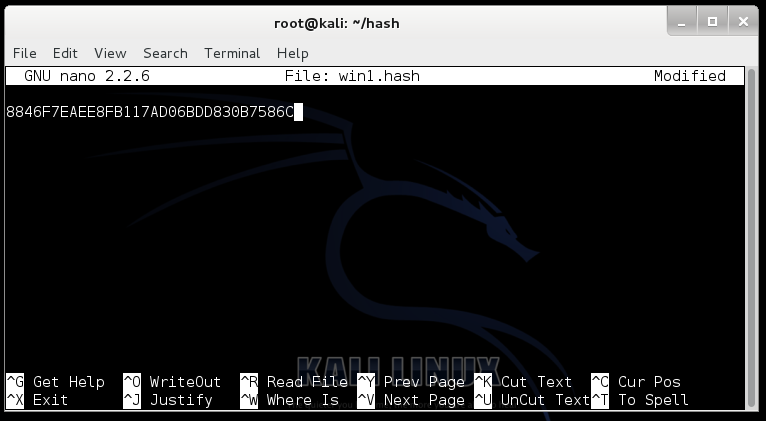
On your Kali Linux machine, in a Terminal window, run this command:
nano win1.hashIn the nano window, from the menu bar at the top, click Edit , Paste
Hash appears, as shown below:
Press Ctrl+X , Y , Enter to save the file.
Download Word List
We'll use a list of about 500,000 commonly used passwords from the RockYou breach.
In a Terminal window, run this command:
curl http://contest-2010.korelogic.com/wordlists/RockYou-MostPopular500000PassesLetters_less50000.dic.gz > rock.dic.gz
gunzip rock.dic.gz
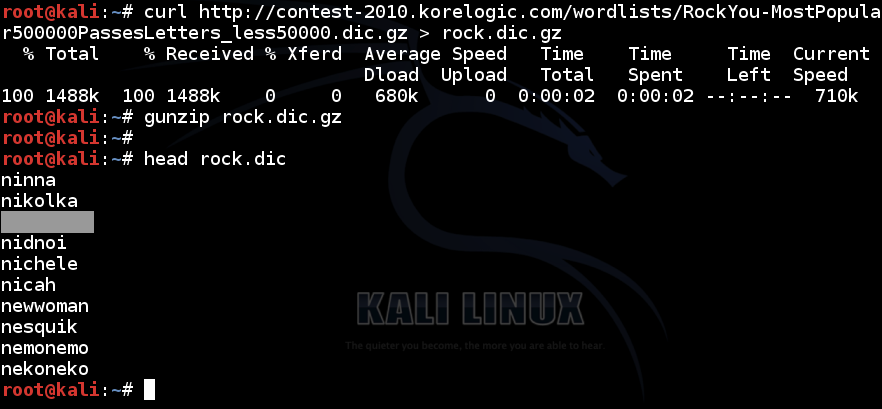
head rock.dic
You will see the first ten passwords, as shown below:
Problem solving
If the server is down, use this command instead:
curl https://samsclass.info/123/proj10/RockYou-MostPopular500000PassesLetters_less50000.dic.gz > rock.dic
head rock.dic
Getting Hashcat 2.00
Hashcat was updated to 3.00 and will not run in virtual machines anymore. The simplest solution is to use an older version.
In a Terminal window, run this command:
cd
mkdir hash
cd hash
wget https://hashcat.net/files_legacy/hashcat-2.00.7z
7z e hashcat-2.00.7z
./hashcat-cli32.bin -V
Problem solving
If that link doesn't work, use this one:
wget https://samsclass.info/123/proj10/hashcat-2.00.7zCracking the Hash
In a Terminal window, run this command:
cd
./hash/hashcat-cli32.bin -m 1000 -a 0 -o winpass1.txt --remove win1.hash rock.dic
Type YES and press Enter. In the Terminal window, run this command:
cat winpass1.txtExplanation: It uses hashcat with these options:
- Windows NT hash (-m 1000)
- Using dictionary attack (-a 0)
- Put the output in the file winpass1.txt
- Deleting each hash as it is found
- Gets the hash from win1.hash
- Using the rock.dic dictionary
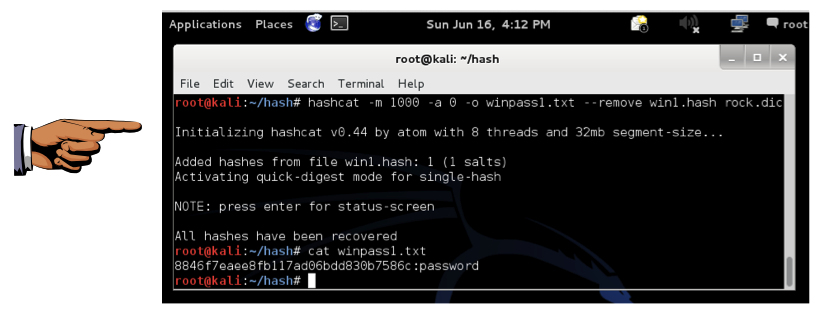
You will see a hash, with the cracked password “password” at the end, as shown below:
Saving Screenshots
Make sure the Terminal window is visible, showing the cracked password "password".
Click on the host machine desktop, outside the virtual machine to activate the host machine desktop.
Press the PrintScrn key to copy the entire desktop to the clipboard.
YOU MUST SEND FULL SCREEN IMAGES FOR FULL CREDIT.
On the host machine, open Paint and paste in the captured image. Save it as "Your Name ProjX16a" .
Get win2.hash List
In a Terminal window, run this command:
curl https://samsclass.info/123/proj10/win2.hash > win2.hash
cat win2.hash
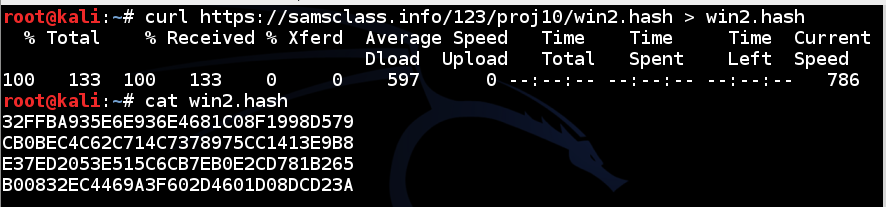
You will see four password hashes, as shown below:
Cracking the Hash
In a Terminal window, run this command:
./hash/hashcat-cli32.bin -m 1000 -a 0 -o winpass2.txt --remove win2.hash rock.dicType YES and press Enter.
In the Terminal window, run this command:
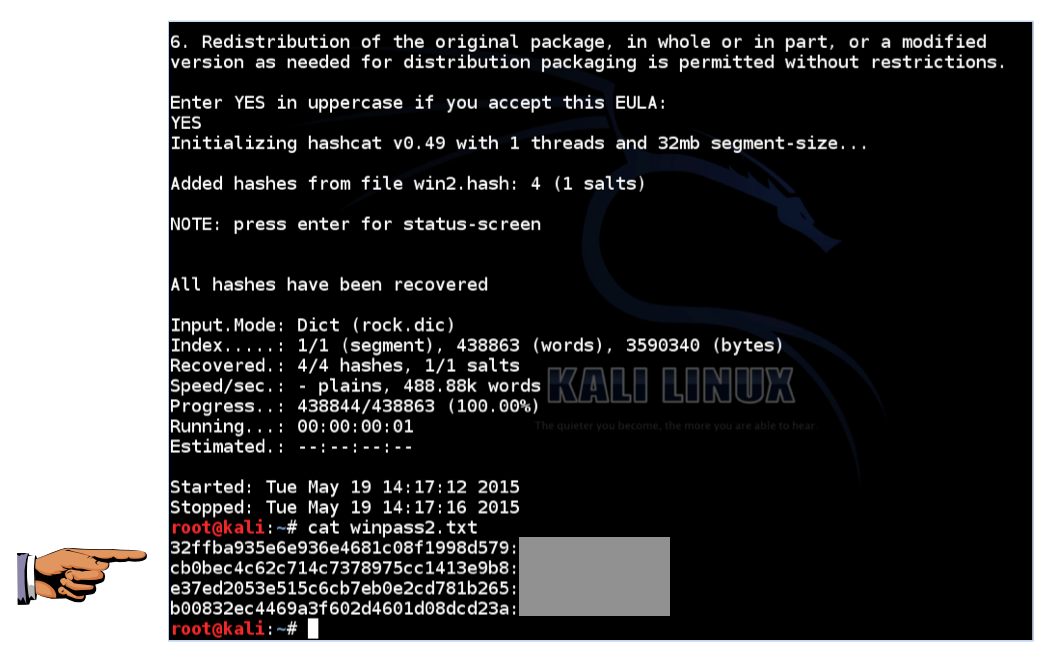
cat winpass2.txtYou will see the hash, with the password found at the end of each line as shown below. (I edited the password.)
Saving Screenshots
Make sure the Terminal window is visible, showing the password found.
Click on the host machine desktop, outside the virtual machine to activate the host machine desktop.
Press the PrintScrn key to copy the entire desktop to the clipboard.
YOU MUST SEND FULL SCREEN IMAGES FOR FULL CREDIT.
On the host machine, open Paint and paste in the captured image. Save it as "Your Name ProjX16b " .
Submitting Your Project
Email the image to [email protected] with the subject line "Proj X16 From Your Name", replacing "Your Name" with your own first and last name. Cc yourself.