

🔥 Huge shoutout to @SVDG_XEC the absolute legend who just swept through my #NFT collection like a storm! 🙌
— Gaexe (@gaexe_) May 30, 2025
Your support isn’t just noticed — it’s legendary. You didn’t just collect — you made history. 🚀
Looks like I’ll be pulling an all-nighter tonight.👨💻🌙 #NFTCollector $XEC pic.twitter.com/vKwKByk7fi
In the previous discussion regarding MotionLayout, we have learned about:
- basic motion
- swipe handling
- custom attribute interpolation
- keyframes
Meanwhile, on this occasion we will discuss how to use MotionLayout, integrate it into CoordinatorLayout, DrawerLayout, or ViewPager.
Using MotionLayout with CoordinatorLayout
Note that MotionLayout can be used to implement similar behavior as CoordinatorLayout. We will show an example of this in a future article.
An easy way to take advantage of MotionLayout this is to use it to define how certain parts of the screen content can be animated. This way, you can add more interesting movement to your existing layout.
For example, you might want to create the following screen.
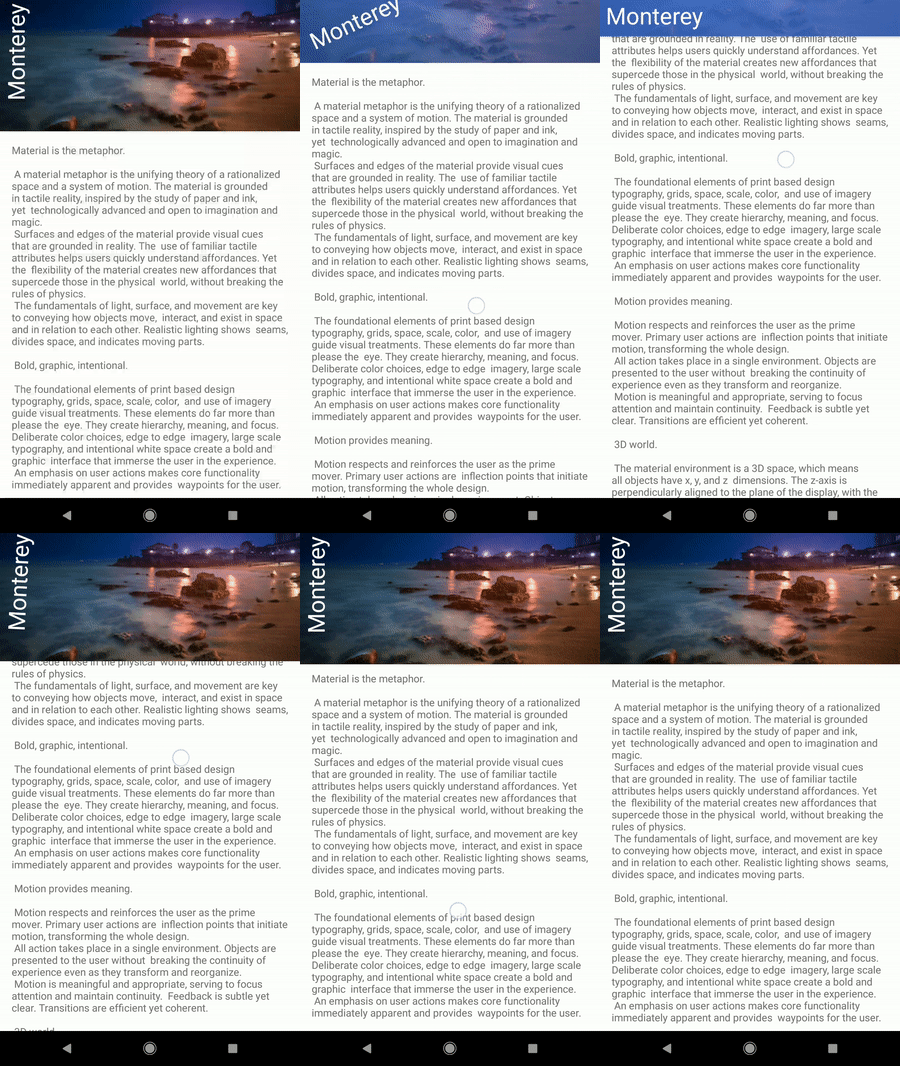
The general idea is to replace the Toolbar di element AppBarLayout with MotionLayout. We then let CoordinatorLayout trigger the animation progress.
You can control the transition position MotionLayout by calling setProgress(), we can create a simple sub class to do this automatically by listening for offset changes AppBarLayout.
import android.content.Context
import android.support.constraint.motion.MotionLayout
import android.support.design.widget.AppBarLayout
import android.util.AttributeSet

class CollapsibleToolbar @JvmOverloads constructor(
        context: Context, attrs: AttributeSet? = null, defStyleAttr: Int = 0
) : MotionLayout(context, attrs, defStyleAttr), AppBarLayout.OnOffsetChangedListener {

    override fun onOffsetChanged(appBarLayout: AppBarLayout?, verticalOffset: Int) {
        progress = -verticalOffset / appBarLayout?.totalScrollRange?.toFloat()!!
    }

    override fun onAttachedToWindow() {
        super.onAttachedToWindow()
        (parent as? AppBarLayout)?.addOnOffsetChangedListener(this)
    }
}
XML files CoordinatorLayout use this subclass instead of Toolbar.
<?xml version="1.0" encoding="utf-8"?>
<android.support.design.widget.CoordinatorLayout xmlns:android="http://schemas.android.com/apk/res/android"
    xmlns:app="http://schemas.android.com/apk/res-auto"
    xmlns:tools="http://schemas.android.com/tools"
    android:id="@+id/content"
    android:layout_width="match_parent"
    android:layout_height="match_parent"
    android:fitsSystemWindows="false"
    android:background="@color/contentBackground">

    <android.support.design.widget.AppBarLayout
        android:id="@+id/app_bar"
        android:layout_width="match_parent"
        android:layout_height="@dimen/app_bar_height"
        android:theme="@style/AppTheme.AppBarOverlay">

        <include layout="@layout/motion_09_coordinatorlayout_header"/>

    </android.support.design.widget.AppBarLayout>

    <include layout="@layout/content_scrolling" />

</android.support.design.widget.CoordinatorLayout>
The only thing left to do is to create a file MotionLayout that contains the views we want to animate. Here we have ImageView one that serves as the background, and TextView.
<?xml version="1.0" encoding="utf-8"?>
<com.google.androidstudio.motionlayoutexample.utils.CollapsibleToolbar
    xmlns:android="http://schemas.android.com/apk/res/android"
    xmlns:tools="http://schemas.android.com/tools"
    xmlns:app="http://schemas.android.com/apk/res-auto"
    android:id="@+id/motionLayout"
    app:layoutDescription="@xml/scene_09"
    android:layout_width="match_parent"
    android:layout_height="match_parent"
    android:minHeight="50dp"
    android:fitsSystemWindows="false"
    app:layout_scrollFlags="scroll|enterAlways|snap|exitUntilCollapsed">

    <ImageView
        android:id="@+id/background"
        android:layout_width="match_parent"
        android:layout_height="200dp"
        android:background="@color/colorAccent"
        android:scaleType="centerCrop"
        android:src="@drawable/monterey"/>

    <TextView
        android:id="@+id/label"
        android:layout_width="wrap_content"
        android:layout_height="wrap_content"
        android:transformPivotX="0dp"
        android:transformPivotY="0dp"
        android:text="Monterey"
        android:textColor="#FFF"
        android:textSize="32dp" />

</com.google.androidstudio.motionlayoutexample.utils.CollapsibleToolbar>
Finally, the animation itself can be defined in MotionScene.
<?xml version="1.0" encoding="utf-8"?>
<MotionScene
    xmlns:android="http://schemas.android.com/apk/res/android"
    xmlns:motion="http://schemas.android.com/apk/res-auto">

    <Transition
        motion:constraintSetStart="@+id/start"
        motion:constraintSetEnd="@+id/end" />

    <ConstraintSet android:id="@+id/start">
        <Constraint
            android:id="@+id/background"
            android:layout_width="match_parent"
            android:layout_height="match_parent"
            android:alpha="1.0"
            motion:layout_constraintBottom_toBottomOf="parent"/>
        <Constraint
            android:id="@+id/label"
            android:layout_width="wrap_content"
            android:layout_height="wrap_content"
            android:rotation="-90.0"
            motion:layout_constraintBottom_toBottomOf="@+id/background"
            motion:layout_constraintStart_toStartOf="parent"/>
    </ConstraintSet>

    <ConstraintSet android:id="@+id/end">
        <Constraint
            android:id="@+id/background"
            android:layout_width="match_parent"
            android:layout_height="match_parent"
            android:alpha="0.2"
            motion:layout_constraintBottom_toBottomOf="parent"/>
        <Constraint
            android:id="@+id/label"
            android:layout_width="wrap_content"
            android:layout_height="wrap_content"
            android:layout_marginStart="8dp"
            android:layout_marginBottom="8dp"
            android:rotation="0.0"
            motion:layout_constraintBottom_toBottomOf="@+id/background"
            motion:layout_constraintStart_toStartOf="parent" />
    </ConstraintSet>
</MotionScene>
Using MotionLayout with DrawerLayout
DrawerLayout is another class provided by the Android framework to display the side panel. We may want to make it look more different and more attractive.
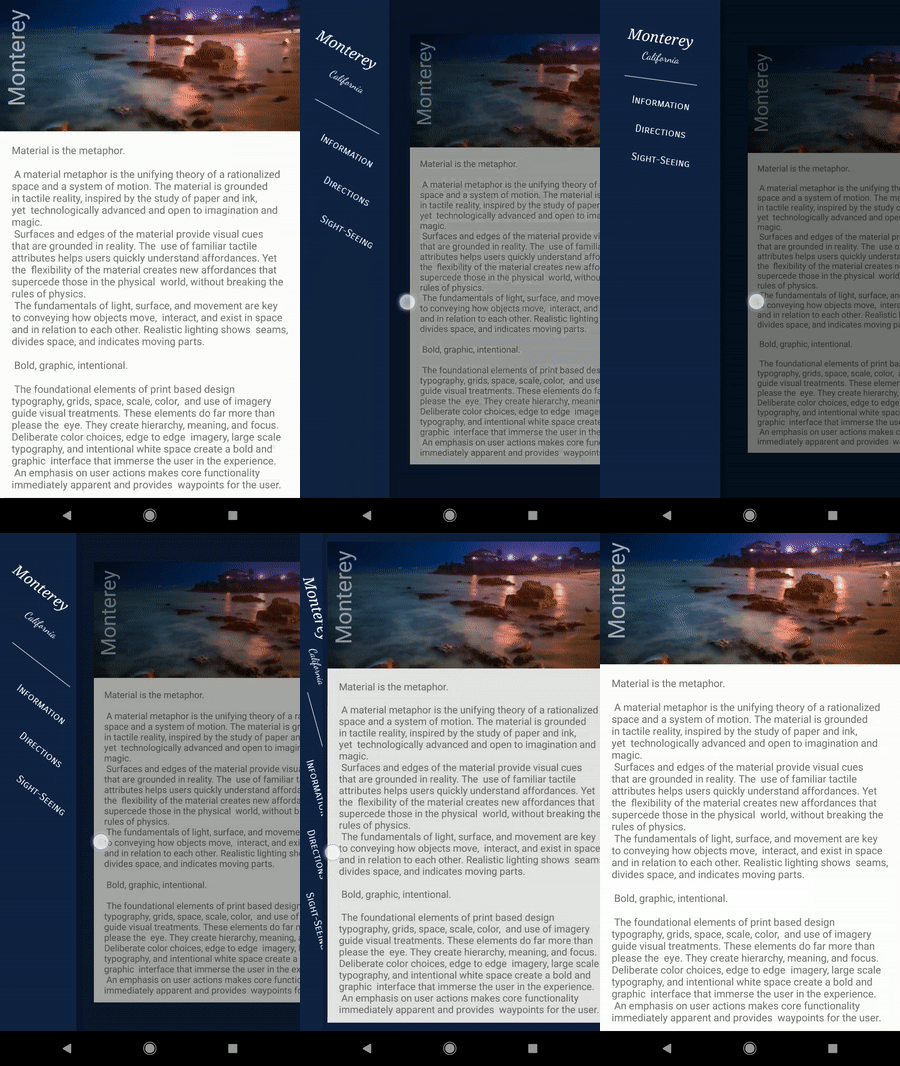
Similar to what we did to integrate MotionLayout with CoordinatorLayout / AppBarLayout, we can create a small subclass that will automatically set progress MotionLayout.
import android.content.Context
import android.support.constraint.motion.MotionLayout
import android.support.v4.widget.DrawerLayout
import android.util.AttributeSet
import android.view.View

class DrawerContent @JvmOverloads constructor(
        context: Context, attrs: AttributeSet? = null, defStyleAttr: Int = 0
) : MotionLayout(context, attrs, defStyleAttr), DrawerLayout.DrawerListener {
    override fun onDrawerStateChanged(newState: Int) {
    }

    override fun onDrawerSlide(drawerView: View, slideOffset: Float) {
        progress = slideOffset
    }

    override fun onDrawerClosed(drawerView: View) {
    }

    override fun onDrawerOpened(drawerView: View) {
    }

    override fun onAttachedToWindow() {
        super.onAttachedToWindow()
        (parent as? DrawerLayout)?.addDrawerListener(this)
    }
}
This subclass will automatically set the progress with the value slideOffset, from the callback onDrawerSlide(). By using this subclass, we can easily integrate MotionLayout in DrawerLayout.
<?xml version="1.0" encoding="utf-8"?>
<android.support.v4.widget.DrawerLayout
    xmlns:android="http://schemas.android.com/apk/res/android"
    android:layout_width="match_parent"
    android:layout_height="match_parent"
    xmlns:app="http://schemas.android.com/apk/res-auto"
    android:id="@+id/motionLayout"
    android:background="@color/colorPrimaryDark">

    <include layout="@layout/motion_12_drawerlayout_content"/>

    <include layout="@layout/motion_13_drawerlayout_menu"/>

</android.support.v4.widget.DrawerLayout>
The file motion_12_drawerlayout_content.xml is just a layout whose contents are the same as the CoordinatorLayout previous example.
The menu file uses MotionLayout (or rather, the subclasses DrawerContent we have created).
<?xml version="1.0" encoding="utf-8"?>
<com.google.androidstudio.motionlayoutexample.utils.DrawerContent
    xmlns:android="http://schemas.android.com/apk/res/android"
    xmlns:app="http://schemas.android.com/apk/res-auto"
    xmlns:tools="http://schemas.android.com/tools"
    android:id="@+id/menu"
    android:layout_width="180dp"
    android:layout_height="match_parent"
    android:layout_gravity="start"
    app:layoutDescription="@xml/scene_13_menu"
    android:background="@color/colorPrimaryDark">

    <TextView
        android:id="@+id/textView"
        android:layout_width="wrap_content"
        android:layout_height="wrap_content"
        android:layout_marginTop="32dp"
        android:text="Monterey"
        android:textSize="20sp"
        android:textStyle="italic"
        android:typeface="serif"
        android:textColor="#FFF"
        app:layout_constraintBottom_toTopOf="@+id/textView3"
        app:layout_constraintEnd_toEndOf="parent"
        app:layout_constraintHorizontal_bias="0.5"
        app:layout_constraintStart_toStartOf="parent"
        app:layout_constraintTop_toTopOf="parent"
        app:layout_constraintVertical_bias="0.0"
        app:layout_constraintVertical_chainStyle="packed" />

    <TextView
        android:id="@+id/textView2"
        android:layout_width="wrap_content"
        android:layout_height="wrap_content"
        android:layout_marginTop="16dp"
        android:text="Information"
        app:fontFamily="sans-serif-smallcaps"
        android:textColor="#FFF"
        app:layout_constraintBottom_toTopOf="@+id/textView4"
        app:layout_constraintEnd_toEndOf="parent"
        app:layout_constraintHorizontal_bias="0.5"
        app:layout_constraintStart_toStartOf="parent"
        app:layout_constraintTop_toBottomOf="@+id/view" />

    <TextView
        android:id="@+id/textView4"
        android:layout_width="wrap_content"
        android:layout_height="wrap_content"
        android:layout_marginTop="16dp"
        android:text="Directions"
        app:fontFamily="sans-serif-smallcaps"
        android:textColor="#FFF"
        app:layout_constraintBottom_toTopOf="@+id/textView5"
        app:layout_constraintEnd_toEndOf="parent"
        app:layout_constraintHorizontal_bias="0.5"
        app:layout_constraintStart_toStartOf="parent"
        app:layout_constraintTop_toBottomOf="@+id/textView2" />

    <TextView
        android:id="@+id/textView5"
        android:layout_width="wrap_content"
        android:layout_height="wrap_content"
        android:layout_marginTop="16dp"
        android:text="Sight-Seeing"
        app:fontFamily="sans-serif-smallcaps"
        android:textColor="#FFF"
        app:layout_constraintBottom_toBottomOf="parent"
        app:layout_constraintEnd_toEndOf="parent"
        app:layout_constraintHorizontal_bias="0.5"
        app:layout_constraintStart_toStartOf="parent"
        app:layout_constraintTop_toBottomOf="@+id/textView4" />

    <View
        android:id="@+id/view"
        android:background="#c2c1c1"
        android:layout_width="100dp"
        android:layout_height="1dp"
        android:layout_marginTop="16dp"
        app:layout_constraintBottom_toTopOf="@+id/textView2"
        app:layout_constraintEnd_toEndOf="parent"
        app:layout_constraintHorizontal_bias="0.5"
        app:layout_constraintStart_toStartOf="parent"
        app:layout_constraintTop_toBottomOf="@+id/textView3" />

    <TextView
        android:id="@+id/textView3"
        android:layout_width="wrap_content"
        android:layout_height="wrap_content"
        android:text="California"
        android:textColor="#FFF"
        app:fontFamily="cursive"
        app:layout_constraintBottom_toTopOf="@+id/view"
        app:layout_constraintEnd_toEndOf="parent"
        app:layout_constraintHorizontal_bias="0.5"
        app:layout_constraintStart_toStartOf="parent"
        app:layout_constraintTop_toBottomOf="@+id/textView" />
</com.google.androidstudio.motionlayoutexample.utils.DrawerContent>
The file MotionScene only rotates different elements (check the rotation attribute between ConstraintSet start and end)
<?xml version="1.0" encoding="utf-8"?>
<MotionScene xmlns:android="http://schemas.android.com/apk/res/android"
    xmlns:motion="http://schemas.android.com/apk/res-auto">

    <Transition
        motion:constraintSetEnd="@+id/end"
        motion:constraintSetStart="@+id/start"
        motion:duration="250" />

    <ConstraintSet android:id="@+id/start">
        <Constraint
            android:id="@+id/textView"
            android:layout_width="wrap_content"
            android:layout_height="wrap_content"
            android:layout_marginTop="32dp"
            android:rotation="90"
            android:translationX="100dp"
            motion:layout_constraintBottom_toTopOf="@+id/textView3"
            motion:layout_constraintEnd_toEndOf="parent"
            motion:layout_constraintStart_toStartOf="parent"
            motion:layout_constraintTop_toTopOf="parent"
            motion:layout_constraintVertical_chainStyle="spread" />

        <Constraint
            android:id="@+id/textView2"
            android:layout_width="wrap_content"
            android:layout_height="wrap_content"
            android:layout_marginTop="16dp"
            android:rotation="90"
            android:translationX="100dp"
            motion:layout_constraintBottom_toTopOf="@+id/textView4"
            motion:layout_constraintEnd_toEndOf="parent"
            motion:layout_constraintStart_toStartOf="parent"
            motion:layout_constraintTop_toBottomOf="@+id/view" />

        <Constraint
            android:id="@+id/textView4"
            android:layout_width="wrap_content"
            android:layout_height="wrap_content"
            android:layout_marginTop="16dp"
            android:rotation="90"
            android:translationX="100dp"
            motion:layout_constraintBottom_toTopOf="@+id/textView5"
            motion:layout_constraintEnd_toEndOf="parent"
            motion:layout_constraintStart_toStartOf="parent"
            motion:layout_constraintTop_toBottomOf="@+id/textView2" />

        <Constraint
            android:id="@+id/textView5"
            android:layout_width="wrap_content"
            android:layout_height="wrap_content"
            android:layout_marginTop="16dp"
            android:rotation="90"
            android:translationX="100dp"
            motion:layout_constraintBottom_toBottomOf="parent"
            motion:layout_constraintEnd_toEndOf="parent"
            motion:layout_constraintStart_toStartOf="parent"
            motion:layout_constraintTop_toBottomOf="@+id/textView4" />

        <Constraint
            android:id="@+id/view"
            android:layout_width="100dp"
            android:layout_height="1dp"
            android:layout_marginTop="16dp"
            android:rotation="90"
            android:translationX="100dp"
            motion:layout_constraintBottom_toTopOf="@+id/textView2"
            motion:layout_constraintEnd_toEndOf="parent"
            motion:layout_constraintStart_toStartOf="parent"
            motion:layout_constraintTop_toBottomOf="@+id/textView3" />

        <Constraint
            android:id="@+id/textView3"
            android:layout_width="wrap_content"
            android:layout_height="wrap_content"
            android:rotation="90"
            android:translationX="100dp"
            motion:layout_constraintBottom_toTopOf="@+id/view"
            motion:layout_constraintEnd_toEndOf="parent"
            motion:layout_constraintStart_toStartOf="parent"
            motion:layout_constraintTop_toBottomOf="@+id/textView" />
    </ConstraintSet>

    <ConstraintSet android:id="@+id/end">
        <Constraint
            android:id="@+id/textView"
            android:layout_width="wrap_content"
            android:layout_height="wrap_content"
            android:layout_marginTop="32dp"
            motion:layout_constraintBottom_toTopOf="@+id/textView3"
            motion:layout_constraintEnd_toEndOf="parent"
            motion:layout_constraintHorizontal_bias="0.5"
            motion:layout_constraintStart_toStartOf="parent"
            motion:layout_constraintTop_toTopOf="parent"
            motion:layout_constraintVertical_bias="0.0"
            motion:layout_constraintVertical_chainStyle="packed" />

        <Constraint
            android:id="@+id/textView2"
            android:layout_width="wrap_content"
            android:layout_height="wrap_content"
            android:layout_marginTop="16dp"
            motion:layout_constraintBottom_toTopOf="@+id/textView4"
            motion:layout_constraintEnd_toEndOf="parent"
            motion:layout_constraintHorizontal_bias="0.5"
            motion:layout_constraintStart_toStartOf="parent"
            motion:layout_constraintTop_toBottomOf="@+id/view" />

        <Constraint
            android:id="@+id/textView4"
            android:layout_width="wrap_content"
            android:layout_height="wrap_content"
            android:layout_marginTop="16dp"
            motion:layout_constraintBottom_toTopOf="@+id/textView5"
            motion:layout_constraintEnd_toEndOf="parent"
            motion:layout_constraintHorizontal_bias="0.5"
            motion:layout_constraintStart_toStartOf="parent"
            motion:layout_constraintTop_toBottomOf="@+id/textView2" />

        <Constraint
            android:id="@+id/textView5"
            android:layout_width="wrap_content"
            android:layout_height="wrap_content"
            android:layout_marginTop="16dp"
            motion:layout_constraintBottom_toBottomOf="parent"
            motion:layout_constraintEnd_toEndOf="parent"
            motion:layout_constraintHorizontal_bias="0.5"
            motion:layout_constraintStart_toStartOf="parent"
            motion:layout_constraintTop_toBottomOf="@+id/textView4" />

        <Constraint
            android:id="@+id/view"
            android:layout_width="100dp"
            android:layout_height="1dp"
            android:layout_marginTop="16dp"
            motion:layout_constraintBottom_toTopOf="@+id/textView2"
            motion:layout_constraintEnd_toEndOf="parent"
            motion:layout_constraintHorizontal_bias="0.5"
            motion:layout_constraintStart_toStartOf="parent"
            motion:layout_constraintTop_toBottomOf="@+id/textView3" />

        <Constraint
            android:id="@+id/textView3"
            android:layout_width="wrap_content"
            android:layout_height="wrap_content"
            motion:layout_constraintBottom_toTopOf="@+id/view"
            motion:layout_constraintEnd_toEndOf="parent"
            motion:layout_constraintHorizontal_bias="0.5"
            motion:layout_constraintStart_toStartOf="parent"
            motion:layout_constraintTop_toBottomOf="@+id/textView" />
    </ConstraintSet>

</MotionScene>