

Natural selection is testing this #Altcoins season 🌊. In this cycle, many are once again diving deep into research, searching for “the best” after Bitcoin & @Joseinnewworld makes waves 124 #NFTs — Wow, a strong signal for those still weighing their moves. #eCash $XEC #CryptoNews pic.twitter.com/GB3dRvH01U
— NFToa (@nftoa_) September 26, 2025
It started when I updated Android Studio to the latest Electric Eel | 2022 version, then it seemed fine when I was working on an Android project based on Kotlin (native).
The story became a horror story when I returned to working on an Android project based on Flutter, I couldn't do a build for the following error reasons:
FAILURE: Build failed with an exception.

* What went wrong:
Execution failed for task ':audioplayers_android:compileDebugKotlin'.
> Failed to query the value of task ':audioplayers_android:compileDebugKotlin' property 'compilerRunner$kotlin_gradle_plugin'.
   > Kotlin could not find the required JDK tools in the Java installation. Make sure Kotlin compilation is running on a JDK, not JRE.
I used to solve a problem like this with references on stackoverflow, but I forgot to save it in my bookmarks so I had trouble remembering it.
While daydreaming with a cup of coffee, I finally managed to remember the method, here is the solution.
Solutip
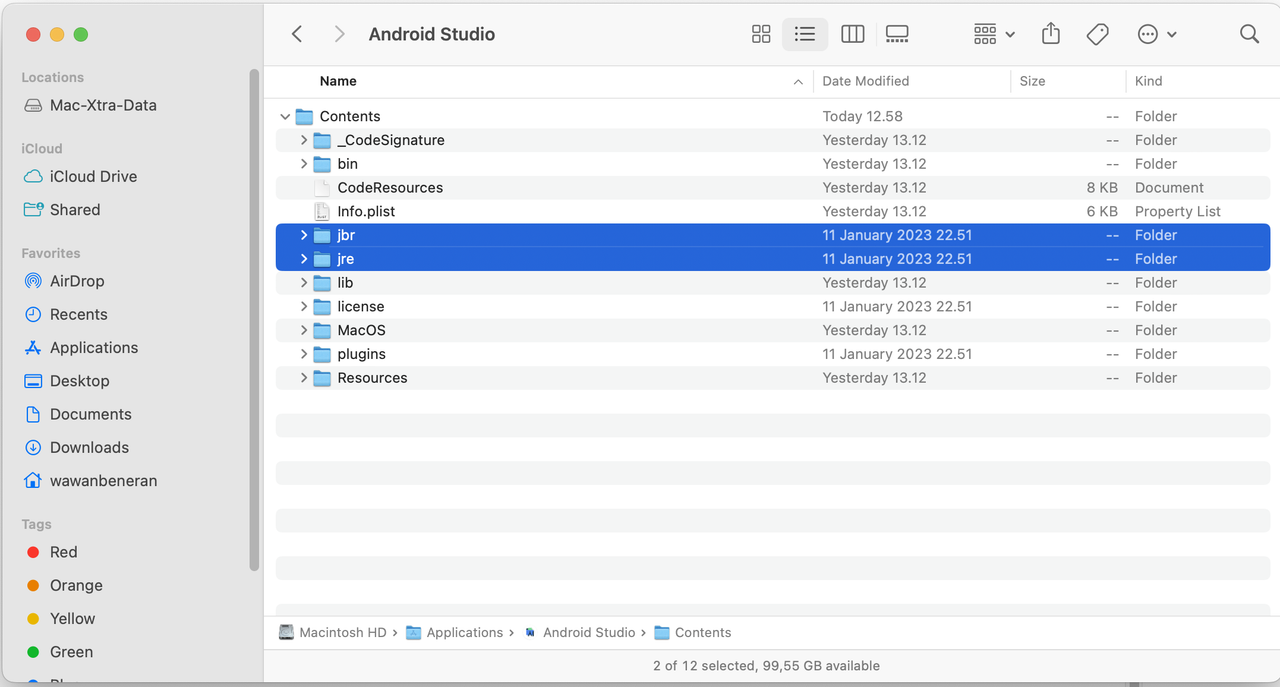
- Open the Android Studio package contents directory as shown in the image above.
- Duplicate jbr folder
- Rename the duplicate folder to jre
Done